

Stay Safe

Use AI with curiosity and good judgment

AI can be helpful, but it can make mistakes. It can also help scammers create convincing messages, voices, images, and video. Slow down and verify unexpected requests before you respond.

Older man reviewing a document beside a laptop

Scams can look and sound real

A familiar face, voice, or company name is not proof

Scammers can use public photos, recordings, and personal details to imitate someone you know. When a large payment is possible, they may invest significant time and money to make the story convincing. End the conversation and contact the person or company independently using a number you already know.

CBS News Texas report about a retiree who lost his savings in a gold bar scam Image: CBS News Texas

A false bank warning cost one retiree his life savings

Robert Brown, a 78-year-old retired geologist, received an email claiming that his bank account had been hacked. Scammers told him to move his money into gold and cryptocurrency for “safekeeping.” Instead, they stole more than $2 million and emptied his retirement savings.

Remember: A real bank will not tell you to protect your money by buying gold or cryptocurrency, or by handing valuables to a courier. Call your bank using the number on the back of your card.

Read the CBS News story
Four warning signs

Pause when a message uses pressure

One warning sign does not prove something is a scam, but it is a good reason to stop and verify.

!

Urgency

You are told to act immediately or something terrible will happen.

$

Unusual payment

You are told to use gift cards, cryptocurrency, a wire transfer, or a payment app.

?

Secrecy

You are told not to speak with family, a bank, or another person you trust.

#

Private information

You are asked for a password, verification code, account number, or Social Security number.

The scale of the problem

Two sets of numbers worth knowing

Official and industry reports show how much money these crimes move every year.

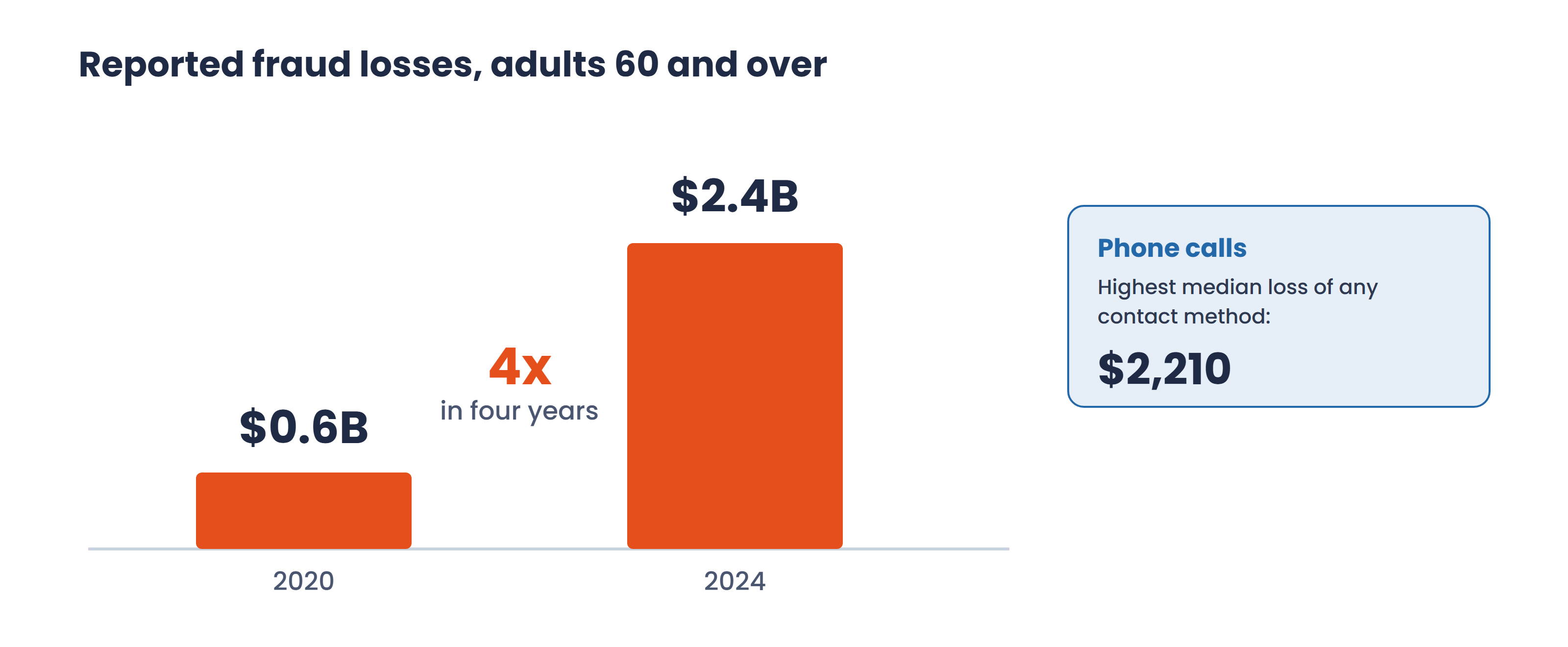
Bar chart: fraud losses reported by adults 60 and over rose from 0.6 billion dollars in 2020 to 2.4 billion dollars in 2024, about four times higher. Phone calls carry the highest median loss of any contact method, at 2,210 dollars.
Losses reported by adults 60 and over rose about four-fold, from $0.6 billion in 2020 to $2.4 billion in 2024, and phone calls carry the highest median loss of any contact method. Source: FTC, Protecting Older Consumers 2024–2025 (December 2025).
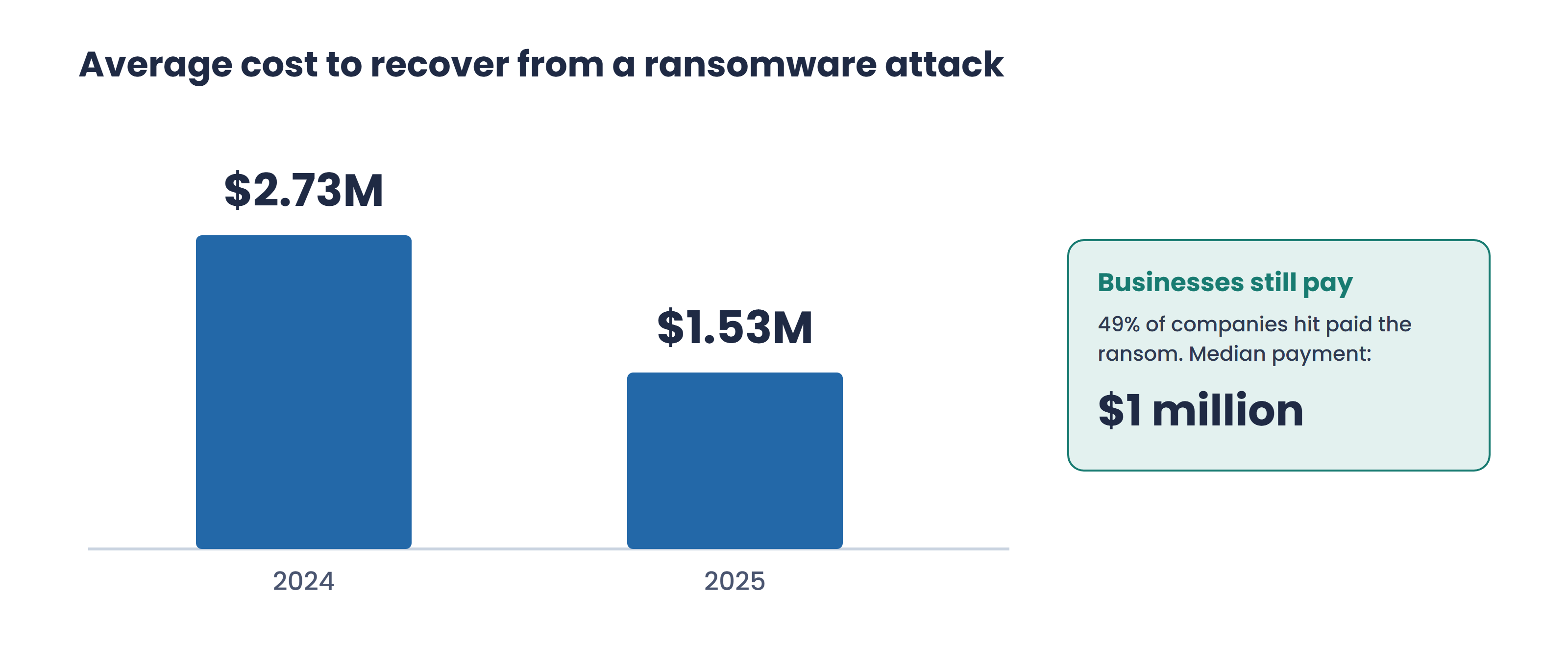
Bar chart: the average cost to recover from a ransomware attack was 2.73 million dollars in 2024 and 1.53 million dollars in 2025. About 49 percent of companies hit paid the ransom, with a median payment of 1 million dollars.
The average cost to recover from a ransomware attack was $1.53 million in 2025, and about half of the companies hit paid a median $1 million ransom. Source: Sophos, The State of Ransomware 2025.

A safer response

Stop, leave, and check another way

  1. Stop the conversation. You do not need to explain or argue. Hang up, close the message, or leave the website.
  2. Do not use the contact information they supplied. Use the number on the back of your card, an official statement, or a website you already know.
  3. Speak with someone you trust. Pressure often feels less convincing once you say the story out loud.
  4. Take action quickly if money or information was shared. Contact the bank, card issuer, payment service, or affected account directly.
A familiar face or voice is not proof. AI tools can imitate a family member using photos, video, or a short voice recording posted online. End the conversation and contact that person using a number you already know.

Your information

Keep sensitive details out of AI chats

Do not paste passwords, verification codes, complete financial account numbers, Social Security numbers, medical records, or copies of identity documents into a general AI assistant.

For personal tasks, remove names and identifying details whenever the task can be completed without them.

Before you share, ask

  • Would I be comfortable putting this information into an ordinary email?
  • Does the AI really need this detail to help me?
  • Can I replace the real information with a general description?

Our part

What Spirantix does with your information

Spirantix does not own a model and does not train one. The AI is built by the companies we use. Here is what we do on your behalf in every tool we connect.

  • We opt you out of data collection and model training in every tool we use. Your account is set that way from the start.
  • We turn on the safety and filtering settings each connected platform offers.
  • We keep your information in your own account. It is not sold, it is not used for advertising, and one member's details are not visible to another.
  • You can have it deleted. Ask, and the account and the records in it are removed.

Use AI as a second opinion

Check a suspicious email before you click

An AI assistant can compare the sender’s full email address with the company named in the message and point out common phishing or scam warning signs.

1

Expand the sender details

Select the sender’s name, address, or small details arrow near From. This reveals the complete email address, not just the friendly display name.

2

Copy without clicking

Copy the visible header, including the full From address and subject, plus the message body. Do not open links or attachments. Remove passwords, codes, account numbers, and other private details.

3

Ask AI to explain the risk

Paste the copied text into ChatGPT, Claude, or another AI assistant. Ask it to compare the sender’s domain with the real company and explain anything suspicious.

AI assistant
Ask:

Review this email for phishing or scam warning signs. Compare the full sender address and domain with the company it claims to represent. Do not tell me it is safe. Explain any mismatch and tell me how to verify the message independently.

Paste the email header and body here
Claims to be fromcompany.com
Actually sent fromsecure-company-help.com
Never click first. A sender address that does not match the company’s official domain is a serious warning sign. An address that looks correct is not proof that the email is safe. Open the company’s website yourself or call a number you already trust to confirm the request.

If something already happened

Act quickly and do not be embarrassed

Scams are designed to be convincing. Contact the company used to send the money, your bank, or the affected account provider immediately. Change exposed passwords and turn on two-factor authentication where available.

For a step-by-step recovery guide, visit the Federal Trade Commission’s consumer advice. You can report fraud at ReportFraud.ftc.gov.